
Clear candidate outreach errors
Candidate errors can be cleared individually or in bulk. This guide explains what each error means and the actions you can take to resolve it:
Clear individual and bulk errors
To clear candidate outreach errors, go to Outreach -> Errors.
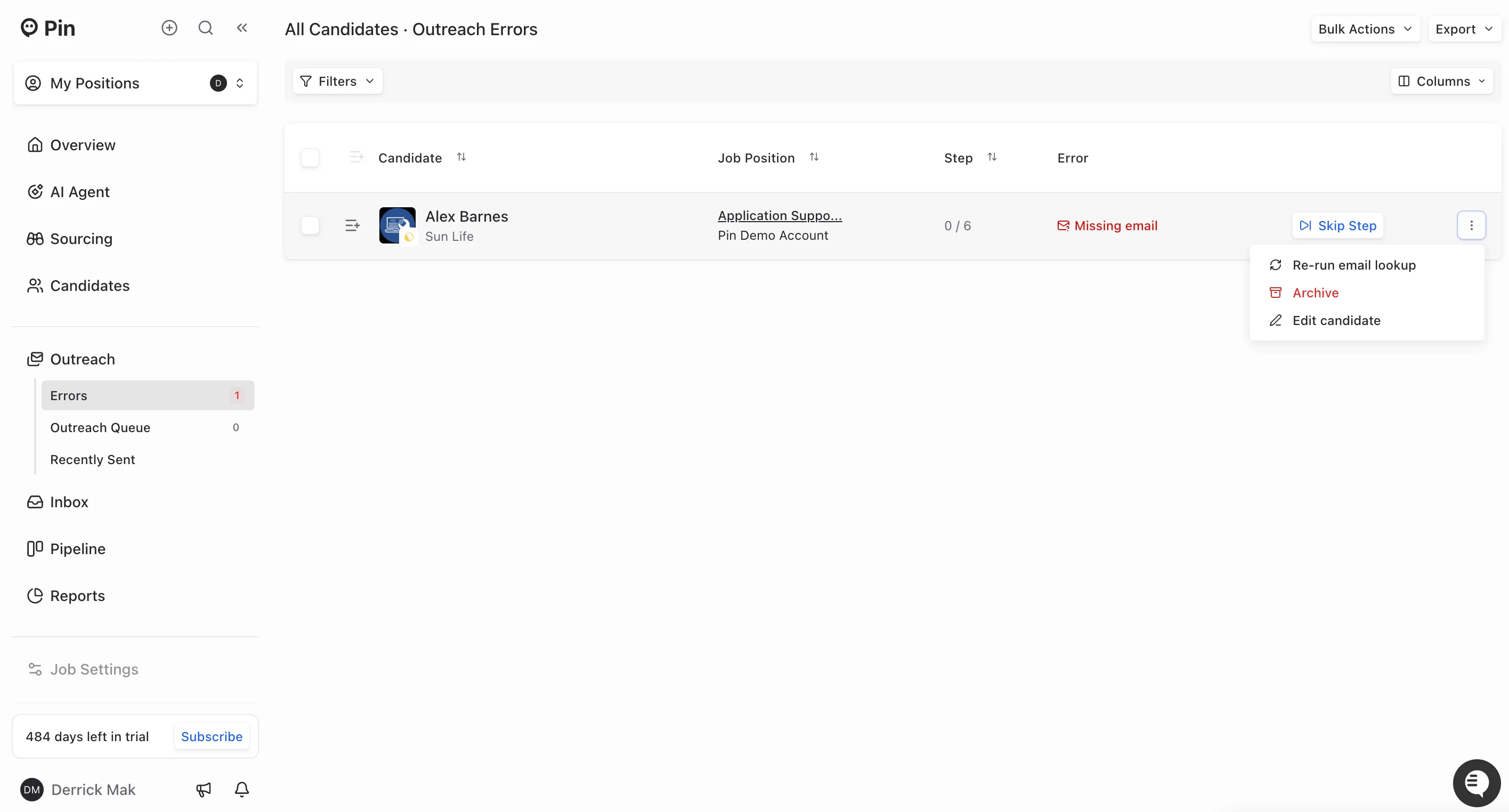
To clear individual errors, click the three-dot icon next to the candidate, then choose the action you’d like to take for that candidate.
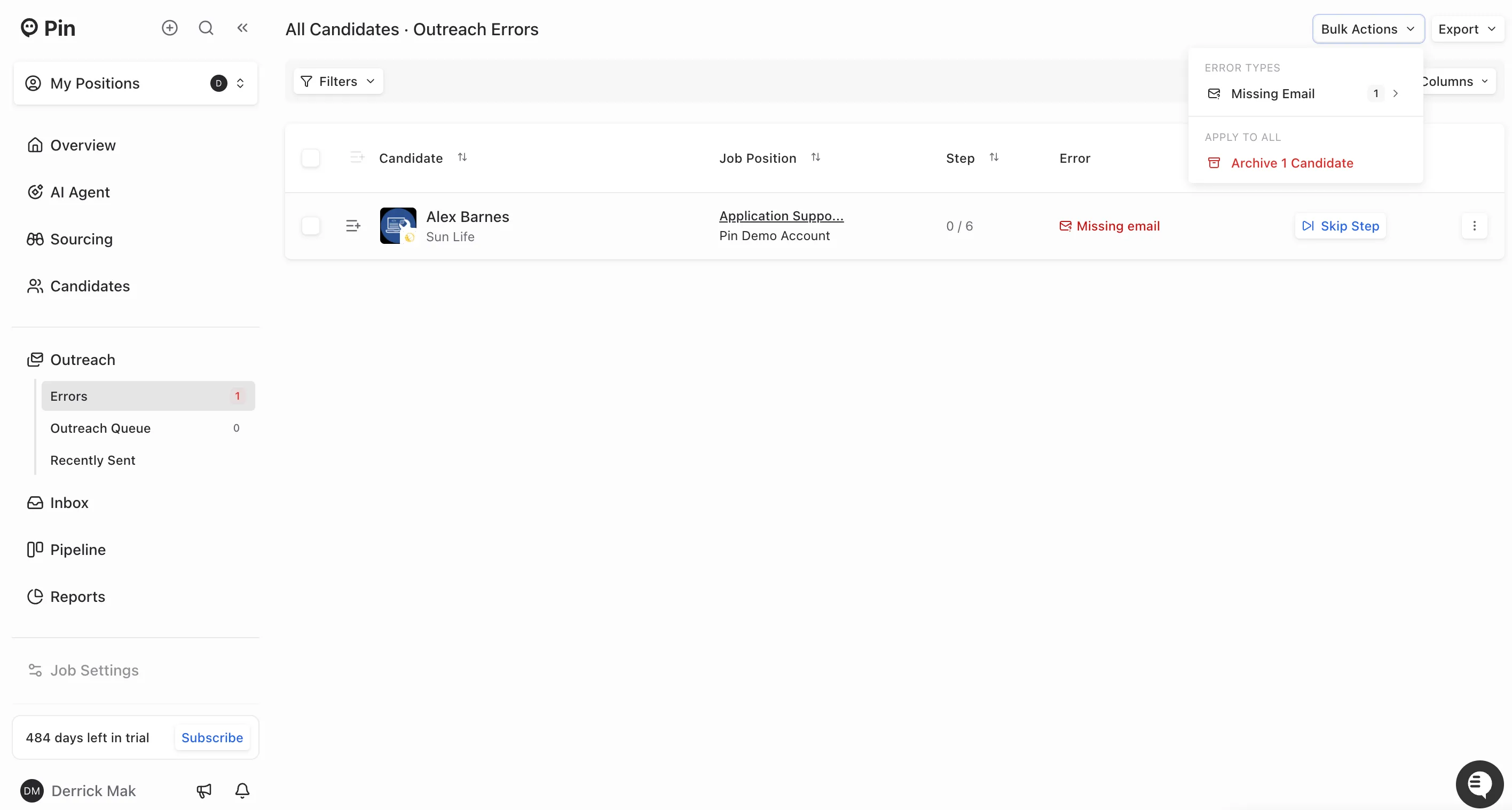
To clear bulk errors, click Bulk Actions, choose the error from the drop-down menu, then select the bulk action you want to apply.
Email Errors
1. Missing Email – The candidate's email address could not be found during lookup
Actions to resolve:
- Re-run email lookup (individual & bulk) – Attempts to find an email again
- Edit candidate (individual only) – Manually add an email address if known
- Skip step (individual & bulk) – Moves to the next sequence step
- Archive (individual & bulk) – Removes candidates from outreach
2. Bounced Email – The email was sent but bounced back (invalid or non-existent)
Actions to resolve:
- Re-run email lookup (individual & bulk) – Attempts to find an email again
- Edit candidate (individual only) – Manually add an email address
- Skip step (individual & bulk) – Moves to the next sequence step
- Archive (individual & bulk) – Removes candidates from outreach
3. Searching for Email – Email lookup is currently in progress
Actions to resolve:
- Edit candidate (individual only) – Manually add email if known
- Skip step (individual & bulk) – Moves to the next sequence step
- Archive (individual & bulk) – Removes candidates from outreach
4. Lookup Credits Exceeded – You've reached your email lookup credit limit
Actions to resolve:
- Re-run email lookup (individual & bulk) – Works once credits are renewed
- Skip step (individual & bulk) – Moves to the next sequence step
- Archive (individual & bulk) – Removes candidates from outreach
ATS Errors
1. Found in ATS – Candidate already exists in your ATS
Actions to resolve:
- Ignore (individual & bulk) – Acknowledges error and continues
- Archive (individual & bulk) – Removes candidates from outreach
Contact Errors
1. In Another Sequence – Candidate is actively being messaged in another sequence
Actions to resolve:
- Ignore (individual & bulk) – Acknowledges and continues outreach
- Archive (individual & bulk) – Removes candidates from outreach
2. Previously Messaged – Candidate was messaged in another sequence
Actions to resolve:
- Ignore (individual & bulk) – Acknowledges and continues outreach
- Archive (individual & bulk) – Removes candidates from outreach
3. Previously Bounced – Candidate’s email bounced in a previous sequence
Actions to resolve:
- Skip step (individual & bulk) – Moves to the next sequence step
- Archive (individual & bulk) – Removes candidates from outreach
4. Previously Unsubscribed – Candidate unsubscribed from previous outreach
Actions to resolve:
- Skip step (individual & bulk) – Moves to the next sequence step
- Archive (individual & bulk) – Removes candidates from outreach
5. Unsubscribed – Candidate's email is in your blocklist
Actions to resolve:
- Remove the candidate's email from your blocklist
- Archive (individual & bulk) – Removes candidates from outreach
System & Technical Errors
1. Messaging Error – A technical error occurred while sending a message
Actions to resolve:
- Retry (individual & bulk) – Attempts to resend the message
- Ignore (individual & bulk) – Acknowledges error and continues
- Archive (individual & bulk) – Removes candidates from outreach
2. Company Preference Blocked – Company preferences prevent outreach to this candidate
Actions to resolve:
- Ignore (individual & bulk) – Acknowledges company preferences and continues
- Archive (individual & bulk) – Removes candidates from outreach