
Set Outreach Error preferences
Outreach Error preferences let you decide in advance what Pin should do when a candidate hits an error during outreach — instead of having every error wait in your Outreach Errors queue for someone to clear manually.
You set these once at the organization level, and they apply as the default for every position. Individual positions can override them where needed.
Note: Looking to clear errors that have already happened? See Clear candidate outreach errors.
Where to find these settings
- Open Settings.
- Select Outreach Errors.
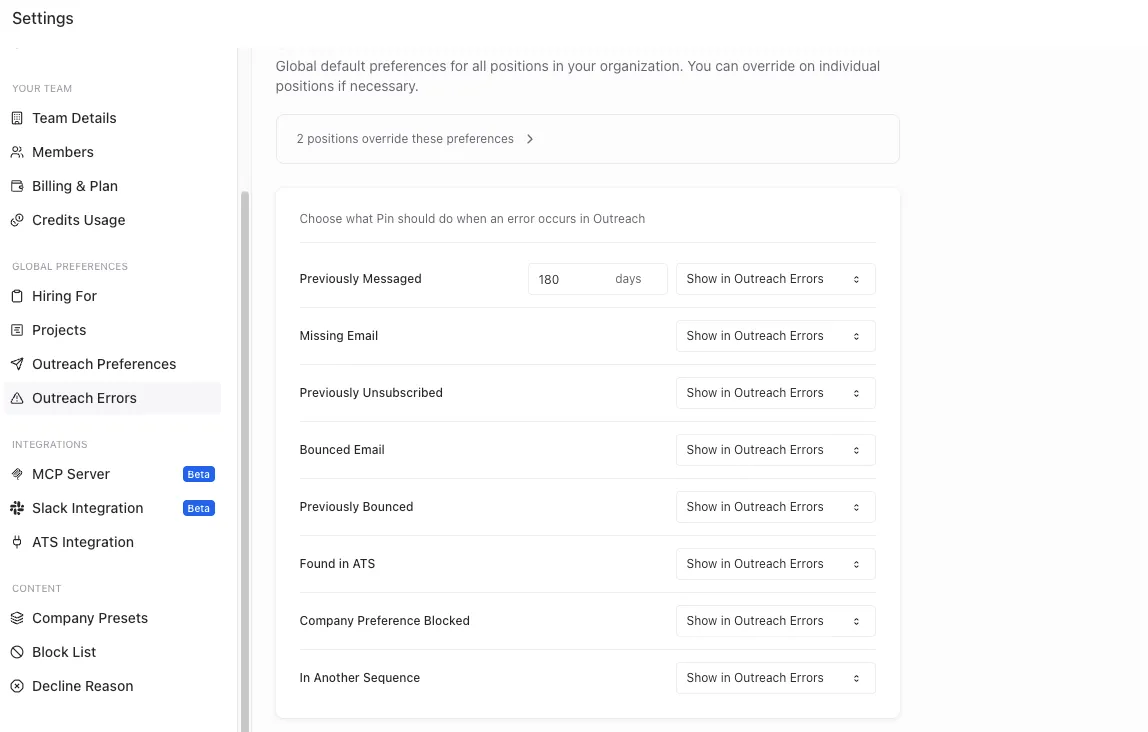
You'll see a list of error types, each with a dropdown controlling what Pin does when that error occurs.
If any position has its own overrides, a banner appears at the top of the page — for example, 1 position overrides these preferences. Click it to see which positions differ from your global defaults.
How the three action types work
Most error types offer some combination of the following:
Action | What happens |
|---|---|
Show in Outreach Errors | The outreach stops and the error is surfaced in Outreach → Errors for someone to review and clear manually. This is the default for every error type. |
Archive Candidate | Pin removes the candidate from outreach automatically and archives them. No review needed. |
Continue Sequence | Pin proceeds with the sequence as though the error hadn't been raised. |
Continue with Bounced Email | Pin keeps sending to the address that previously bounced. |
Choose Show in Outreach Errors when you want a human decision on every case. Choose one of the automatic actions when the outcome is always going to be the same and you'd rather not work the queue.
Available preferences
Previously Messaged
The candidate was messaged from your organization within a defined lookback window.
This is the only preference with a time window setting. Set the number of days (default: 180) that Pin should look back when deciding whether a candidate counts as previously messaged.
Options:
- Show in Outreach Errors
- Archive Candidate
- Continue Sequence
Missing Email
Pin could not find an email address for the candidate.
Options:
- Show in Outreach Errors
- Archive Candidate
- Skip Email Steps
Previously Unsubscribed
The candidate unsubscribed from earlier outreach.
Options:
- Show in Outreach Errors
- Archive Candidate
There is no "continue" option here — Pin will not resume email outreach to a candidate who has unsubscribed.
Bounced Email
The candidate's email address bounced.
Options:
- Show in Outreach Errors
- Archive Candidate
- Continue with Bounced Email
Previously Bounced
The candidate's email address bounced on a previous send.
Options:
- Show in Outreach Errors
- Archive Candidate
- Continue with Bounced Email
Found in ATS
The candidate already exists in your connected ATS.
Options:
- Show in Outreach Errors
- Archive Candidate
- Continue Sequence
Company Preference Blocked
Your company preferences prevent outreach to this candidate — for example, they currently work at a company you've excluded. See Customizing candidate preferences by company.
Options:
- Show in Outreach Errors
- Archive Candidate
- Continue Sequence
In Another Sequence
The candidate is actively being messaged in another sequence. See Messaging the same candidate in multiple sequences.
Options:
- Show in Outreach Errors
- Archive Candidate
- Continue Sequence
Quick reference
Error type | Show in Outreach Errors | Archive Candidate | Third option |
|---|---|---|---|
Previously Messaged (with day window) | ✅ | ✅ | Continue Sequence |
Missing Email | ✅ | ✅ | Skip Email Steps |
Previously Unsubscribed | ✅ | ✅ | — |
Previously Bounced | ✅ | ✅ | Continue with Bounced Email |
Found in ATS | ✅ | ✅ | Continue Sequence |
Company Preference Blocked | ✅ | ✅ | Continue Sequence |
In Another Sequence | ✅ | ✅ | Continue Sequence |
Things to keep in mind
- These are defaults, not locks. Position-level overrides take precedence over what you set here.
- Automatic actions reduce visibility. If you set an error to Archive Candidate or Continue Sequence, those candidates no longer appear in your Outreach Errors queue, so you won't see a running record of how often that error fires.
- Be deliberate with Continue with Bounced Email. Repeatedly sending to invalid addresses raises your bounce rate, which can hurt the deliverability of your sending domain.