
Understanding lookup credits
4 min
This guide covers:
How lookup credits work
Credit Allocation:
- Lookup credits are pooled and shared across the entire team.
Credit Usage:
- Email lookups cost 1 credit.
- Phone number lookups cost 1 credit, and can only run after an email lookup. If Pin finds both an email and a phone number, the total cost is 2 credits. If Pin doesn’t find an email but finds a phone number, the total cost is 1 credit.
- Phone number lookups can be triggered manually per candidate or automatically for all candidates in a sequence. Learn more about phone number lookups in our guide here.
- As a soft rate limit, each user in an organization is allotted CSV exports of 1500 for candidates where no email or phone number was found per month. After 1500, the exports for candidates with no email or phone will now cost 0.25 credits per candidate. This limit will reset at the end of the month.
When Lookups Are Triggered:
- Pin automatically runs email lookups when candidates are added to Outreach.
- Lookups are not performed for candidates in the Sourcing stage.
When Credits Are Deducted:
- Credits are only used if Pin successfully finds an email or phone number.
- If Pin cannot find an email or phone number, credits will not be deducted.
Credit Reset & Rollover:
- Lookup credits reset each billing cycle on your subscription renewal date. You can find your renewal date in Settings -> Billing & Plan -> Customer Portal.
- Unused credits do not roll over to the next billing period.
How to check your lookup balance
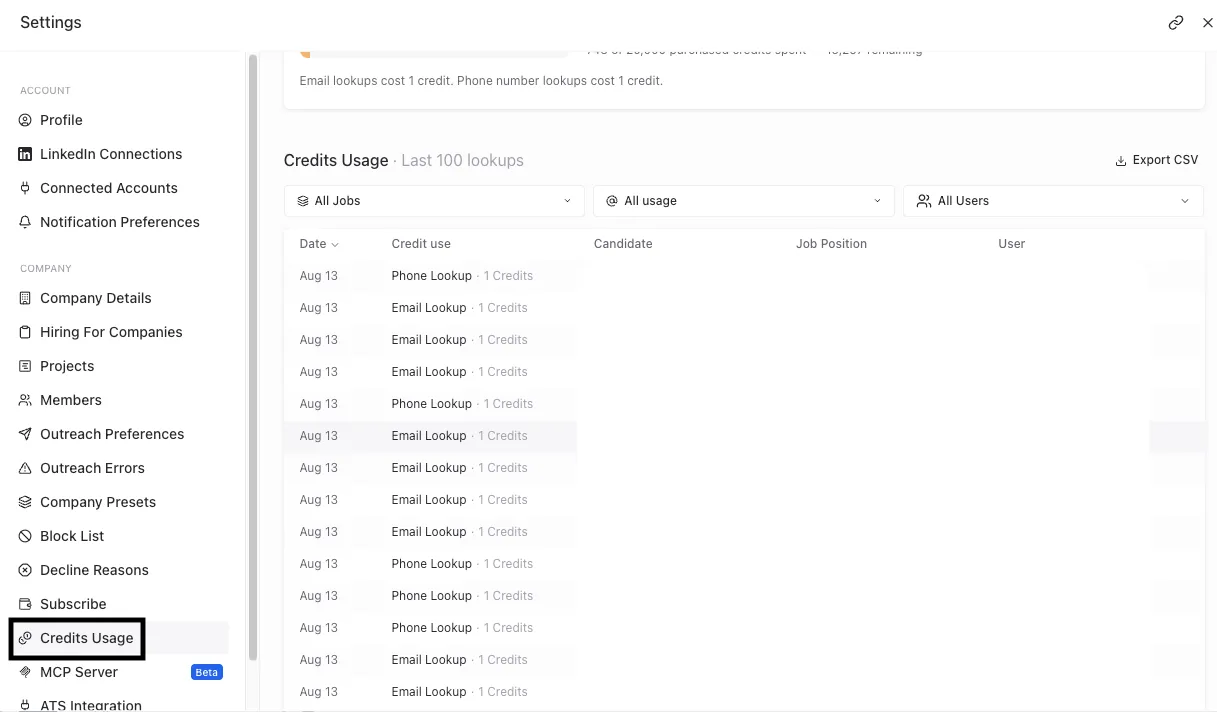
Each user can check the team's lookup balance in Settings -> Credits Usage. Here you can see the last 100 lookups, including which lookup was performed and which candidate it was for.
Purchase additional lookup credits
Only users with Admin and Billing permissions can purchase additional lookup credits in Credits Usage or Billing & Plan. Lookup credits are available in packs of 250 for $50 per pack.